
Setting Up A Raspberry Pi (Or Any Linux System) To Provide DNS/DHCP/NAT#
# nmcli connection show
NAME                UUID                                  TYPE      DEVICE
faschingbauer3      36f2f814-86d6-4b01-9c4e-2b9a4b57f80e  wifi      wlan0
Wired connection 1  2eac9fc1-5776-3f44-a679-927e2ccee95b  ethernet  eth0
lo                  3017f34c-16a4-400a-94ec-eea46b24146a  loopback  lo
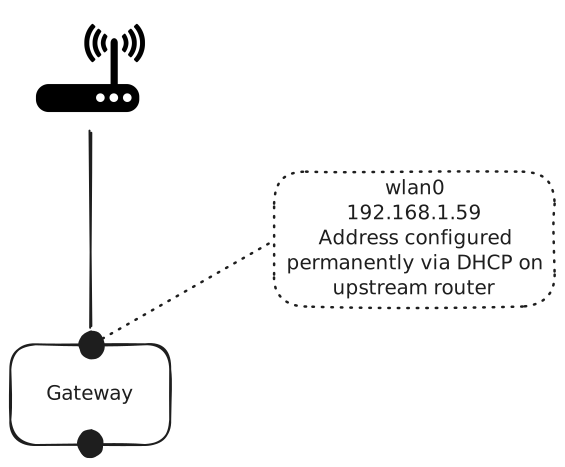
External Interface: wlan0#
Leave that interface untouched, mostly. It is configured by the upstream router. I configured the router (a Fritzbox) to give it the same address everytime it asks.
ipv4.method should be set to auto, which means “get config
over DHCP”.
# nmcli connection show faschingbauer3 |grep ipv4.method
ipv4.method:                            auto
eth0 (“Internal”)#
Static IP Address#
This is the upstream for the (wired) host on the internal network, which should have a fixed IP address.
# nmcli connection down 'Wired connection 1'
# nmcli connection modify 'Wired connection 1' ipv4.addresses 192.168.2.1/24
# nmcli connection modify 'Wired connection 1' ipv4.method manual
# nmcli connection up 'Wired connection 1'
dnsmasq#
# apt install dnsmasq
Configure DHCP range, and announce gateway as gateway
/etc/dnsmasq.conf#domain-needed bogus-priv dhcp-range=192.168.2.50,static,48h dhcp-option=option:router,192.168.2.1
Start at boot
# systemctl enable dnsmasq.service
IP Forwarding And NAT#
# echo 1 > /proc/sys/net/ipv4/ip_forward
# apt install iptables
# INTERNAL=eth0
# EXTERNAL=wlan0
# /sbin/iptables -t nat -A POSTROUTING -o $EXTERNAL -j MASQUERADE
# /sbin/iptables -A FORWARD -i $EXTERNAL -o $INTERNAL -m state --state RELATED,ESTABLISHED -j ACCEPT
# /sbin/iptables -A FORWARD -i $EXTERNAL -o $INTERNAL -j ACCEPT
Create a systemd servive that executes these steps for every boot …
Save
iptablesstate# iptables-save > /etc/myrouter.conf
Create systemd service
/etc/systemd/system/myrouter.service[Unit] Description='My Router' [Service] Type=oneshot ExecStart=sh -c '/usr/sbin/iptables-restore < /etc/myrouter.conf' ExecStart=sh -c 'echo 1 > /proc/sys/net/ipv4/ip_forward' [Install] WantedBy=multi-user.target
Start at boot
# systemctl enable myrouter.service
Reboot
Miscellaneous Commands#
Tunnel (and keepalive pulse) from outside localhost/2022 to
192.168.2.80 behind the router:
$ ssh -L 2022:192.168.2.80:22 tbk-gw 'i=0; while true; do echo howdy $i; i=$(($i+1)); sleep 5; done'
Use that tunnel to login on 192.168.2.80:
$ ssh -p 2022 localhost
Why Use A Container When There Is chroot?